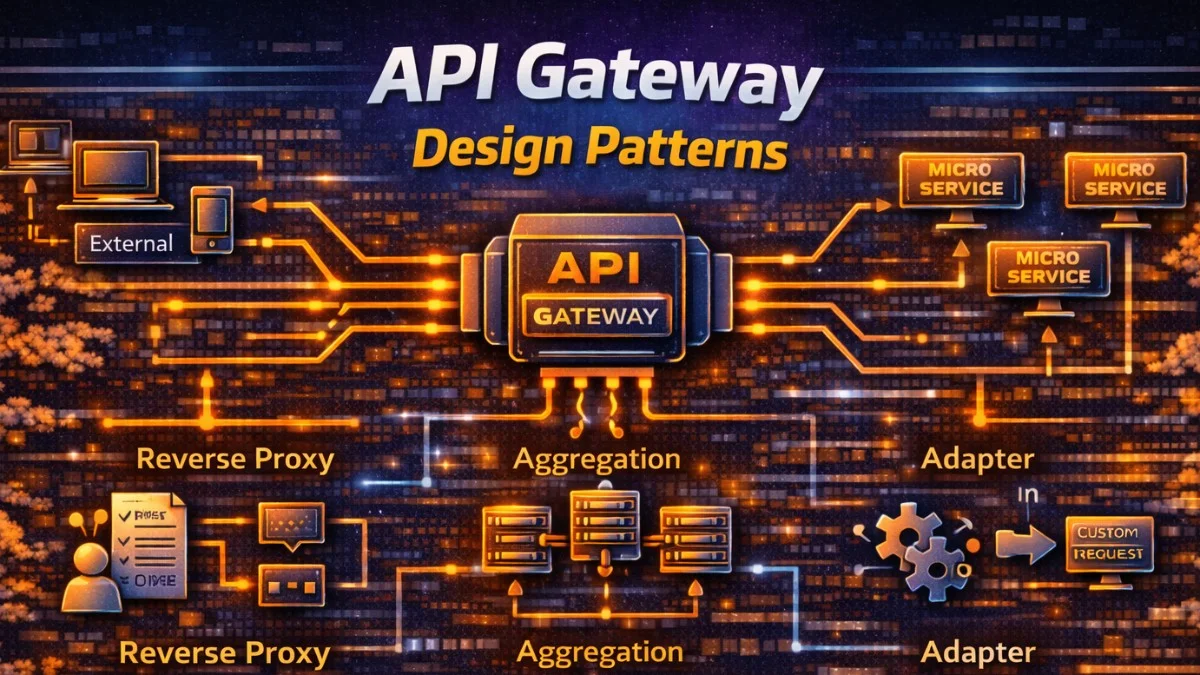
API gateways serve as the front door to your microservices, handling cross-cutting concerns like authentication, rate limiting, and request routing. This guide covers patterns for designing effective API gateways.
What Is an API Gateway?
The Problem
Without a gateway, clients must:
- Know addresses of all services
- Handle authentication with each service
- Manage different protocols
- Implement retry logic everywhere
This leads to duplicated logic and tight coupling between clients and your internal service architecture. The diagram below illustrates this problematic pattern.
Client → Service A (auth, rate limit, logging)
      → Service B (auth, rate limit, logging)
      → Service C (auth, rate limit, logging)
The Solution
An API gateway centralizes these concerns, providing a single entry point for all client requests. The gateway handles cross-cutting concerns once, simplifying both client and service implementations.
Client → API Gateway → Service A
                    → Service B
                    → Service C
The gateway handles cross-cutting concerns once.
Core Responsibilities
Request Routing
The gateway's most fundamental job is routing requests to the appropriate backend service based on the URL path. This configuration maps URL prefixes to internal service addresses, allowing you to change internal topology without affecting clients.
# Kong configuration
services:
  - name: users-service
    url: http://users:8080
    routes:
      - paths: ["/api/users"]

  - name: orders-service
    url: http://orders:8080
    routes:
      - paths: ["/api/orders"]

  - name: products-service
    url: http://products:8080
    routes:
      - paths: ["/api/products"]
This routing abstraction lets you change internal service locations without affecting clients.
Authentication
Centralized authentication at the gateway means individual services trust that incoming requests are already authenticated. This simplifies service development significantly. You can configure JWT validation directly in the gateway.
# Verify JWT at gateway
plugins:
  - name: jwt
    config:
      secret_is_base64: false
      claims_to_verify:
        - exp
      header_names:
        - Authorization
For more complex authentication logic, you can implement it as middleware in your gateway application. The following example validates JWTs and extracts user information for downstream services.
// Laravel gateway middleware
class GatewayAuthentication
{
    public function handle(Request $request, Closure $next)
    {
        $token = $request->bearerToken();

        if (!$token) {
            return response()->json(['error' => 'Unauthorized'], 401);
        }

        try {
            $payload = JWT::decode($token, $this->publicKey, ['RS256']);
            $request->attributes->set('user_id', $payload->sub);
            $request->attributes->set('scopes', $payload->scopes);
        } catch (Exception $e) {
            return response()->json(['error' => 'Invalid token'], 401);
        }

        return $next($request);
    }
}
Notice how the middleware attaches user information to the request attributes. Backend services can then access this data without re-validating the token.
Rate Limiting
Rate limiting protects your services from abuse and ensures fair resource allocation among clients. Configure limits based on your capacity and business requirements. Kong provides built-in rate limiting with Redis backend for distributed state.
# Kong rate limiting
plugins:
  - name: rate-limiting
    config:
      minute: 100
      hour: 1000
      policy: redis
      redis_host: redis
Here is a Laravel implementation that supports different limits for authenticated and anonymous users. The key resolution logic determines whether to rate limit by user ID or IP address.
// Laravel rate limiting
class GatewayRateLimiter
{
    public function handle(Request $request, Closure $next)
    {
        $key = $this->resolveKey($request);
        $limit = $this->getLimit($request);

        if (RateLimiter::tooManyAttempts($key, $limit)) {
            $retryAfter = RateLimiter::availableIn($key);
            return response()->json(
                ['error' => 'Rate limit exceeded'],
                429,
                ['Retry-After' => $retryAfter]
            );
        }

        RateLimiter::hit($key, 60);

        return $next($request);
    }

    private function resolveKey(Request $request): string
    {
        $userId = $request->attributes->get('user_id');
        return $userId ? "user:{$userId}" : "ip:{$request->ip()}";
    }
}
The Retry-After header tells clients exactly when they can retry, which is important for well-behaved API clients.
Request/Response Transformation
Sometimes you need to transform requests or responses to maintain backward compatibility or standardize formats. This middleware wraps legacy API responses in a consistent envelope format, adding metadata to every response.
// Transform legacy API response
class TransformLegacyResponse
{
    public function handle(Request $request, Closure $next)
    {
        $response = $next($request);

        if ($request->is('api/v1/*')) {
            $data = json_decode($response->getContent(), true);

            // Transform to new format
            $transformed = [
                'data' => $data['result'] ?? $data,
                'meta' => [
                    'timestamp' => now()->toIso8601String(),
                    'version' => 'v1',
                ],
            ];

            $response->setContent(json_encode($transformed));
        }

        return $response;
    }
}
This pattern is particularly useful during API migrations, allowing you to maintain v1 compatibility while internal services return v2 formats.
Request Aggregation
Backend for Frontend (BFF)
Different clients often have different data needs. A mobile app might need a compact dashboard view, while a web app needs more detail. The BFF pattern creates specialized gateways for each client type, as shown in this architecture.
Mobile App → Mobile BFF → Users Service
                       → Orders Service
                       → Products Service

Web App → Web BFF → Users Service
                 → Orders Service
                 → Products Service
The following controller aggregates data from multiple services into a single response optimized for mobile clients. Using parallel requests minimizes latency.
// Mobile BFF endpoint
class MobileDashboardController
{
    public function index(Request $request)
    {
        $userId = $request->attributes->get('user_id');

        // Parallel requests to backend services
        $responses = Http::pool(fn ($pool) => [
            $pool->get("http://users-service/users/{$userId}"),
            $pool->get("http://orders-service/users/{$userId}/orders?limit=5"),
            $pool->get("http://products-service/recommendations/{$userId}?limit=3"),
        ]);

        return response()->json([
            'user' => $responses[0]->json(),
            'recent_orders' => $responses[1]->json(),
            'recommendations' => $responses[2]->json(),
        ]);
    }
}
The Http::pool method executes all requests concurrently. Without this, three sequential 100ms requests would take 300ms total; with pooling, they complete in about 100ms.
GraphQL Gateway
GraphQL provides another approach to request aggregation, letting clients specify exactly what data they need in a single query. This single query aggregates data from three different services based on the fields requested.
# Single query aggregates multiple services
query Dashboard {
  user(id: "123") {          # Users service
    name
    email
  }
  orders(userId: "123") {    # Orders service
    id
    total
    status
  }
  recommendations(limit: 5) { # Products service
    id
    name
    price
  }
}
This approach shifts aggregation logic to the client, which can be more flexible but requires more sophisticated client implementations.
Circuit Breaker
Preventing Cascade Failures
When a backend service fails, you do not want the gateway to keep sending requests and backing up. A circuit breaker detects failures and fails fast, giving the struggling service time to recover. This implementation tracks success and failure rates to determine when to open the circuit.
class CircuitBreakerMiddleware
{
    public function handle(Request $request, Closure $next)
    {
        $service = $this->resolveService($request);
        $circuitBreaker = $this->getCircuitBreaker($service);

        if ($circuitBreaker->isOpen()) {
            return $this->fallbackResponse($service);
        }

        try {
            $response = $next($request);

            if ($response->isServerError()) {
                $circuitBreaker->recordFailure();
            } else {
                $circuitBreaker->recordSuccess();
            }

            return $response;
        } catch (Exception $e) {
            $circuitBreaker->recordFailure();
            return $this->fallbackResponse($service);
        }
    }

    private function fallbackResponse(string $service)
    {
        return response()->json([
            'error' => 'Service temporarily unavailable',
            'service' => $service,
        ], 503);
    }
}
The circuit breaker has three states: closed (normal operation), open (failing fast), and half-open (testing if recovery occurred). This pattern prevents a single failing service from bringing down your entire system.
Load Balancing
Strategies
The gateway distributes traffic across multiple instances of backend services. Different strategies suit different scenarios. The following Nginx configuration demonstrates four common load balancing approaches.
# Nginx upstream configuration
upstream backend {
    # Round Robin (default)
    server backend1:8080;
    server backend2:8080;
    server backend3:8080;
}

upstream backend_weighted {
    # Weighted
    server backend1:8080 weight=5;
    server backend2:8080 weight=3;
    server backend3:8080 weight=2;
}

upstream backend_least {
    # Least Connections
    least_conn;
    server backend1:8080;
    server backend2:8080;
}

upstream backend_hash {
    # IP Hash (sticky sessions)
    ip_hash;
    server backend1:8080;
    server backend2:8080;
}
Round robin works well for stateless services. Weighted distribution helps when servers have different capacities. Least connections is best when request processing times vary significantly. IP hash provides session affinity without explicit session management.
Protocol Translation
REST to gRPC
Your gateway can expose REST APIs while backend services use more efficient protocols like gRPC. This gives clients a familiar REST interface while your internal services benefit from gRPC's performance. The controller below translates REST requests into gRPC calls.
class GrpcBridgeController
{
    public function getUser(Request $request, $id)
    {
        $client = new UserServiceClient('users-service:50051', [
            'credentials' => ChannelCredentials::createInsecure(),
        ]);

        $grpcRequest = new GetUserRequest();
        $grpcRequest->setId($id);

        [$response, $status] = $client->GetUser($grpcRequest)->wait();

        if ($status->code !== \Grpc\STATUS_OK) {
            return response()->json(['error' => $status->details], 500);
        }

        return response()->json([
            'id' => $response->getId(),
            'name' => $response->getName(),
            'email' => $response->getEmail(),
        ]);
    }
}
This translation layer isolates clients from protocol changes and lets you evolve internal communication patterns independently.
WebSocket Proxy
WebSocket connections require special handling since they upgrade from HTTP and maintain long-lived connections. The gateway authenticates the initial connection then proxies the WebSocket traffic. This Node.js example shows the upgrade handling.
// Gateway handles WebSocket upgrade
const WebSocket = require('ws');
const httpProxy = require('http-proxy');

const proxy = httpProxy.createProxyServer({
    target: 'ws://notifications-service:8080',
    ws: true
});

server.on('upgrade', (req, socket, head) => {
    // Authenticate WebSocket connection
    const token = req.url.split('token=')[1];
    if (!validateToken(token)) {
        socket.destroy();
        return;
    }

    proxy.ws(req, socket, head);
});
Authenticating at connection time rather than per-message significantly reduces overhead for high-frequency WebSocket communication.
Caching
Response Caching
The gateway can cache responses to reduce backend load and improve latency. Only cache GET requests and respect cache headers from backend services. This middleware implements a complete caching layer with cache hit indicators.
class GatewayCacheMiddleware
{
    public function handle(Request $request, Closure $next)
    {
        if ($request->method() !== 'GET') {
            return $next($request);
        }

        $cacheKey = $this->cacheKey($request);
        $cached = Cache::get($cacheKey);

        if ($cached) {
            return response($cached['body'], 200, $cached['headers'])
                ->header('X-Cache', 'HIT');
        }

        $response = $next($request);

        if ($response->isSuccessful() && $this->isCacheable($response)) {
            $ttl = $this->parseCacheControl($response);
            Cache::put($cacheKey, [
                'body' => $response->getContent(),
                'headers' => $response->headers->all(),
            ], $ttl);
        }

        return $response->header('X-Cache', 'MISS');
    }
}
The X-Cache header helps with debugging and lets clients know whether they received a cached response.
Observability
Request Logging
Comprehensive request logging at the gateway provides visibility into all API traffic. Include correlation IDs to trace requests across services. This middleware logs every request with timing and user context.
class RequestLoggingMiddleware
{
    public function handle(Request $request, Closure $next)
    {
        $requestId = Str::uuid()->toString();
        $request->headers->set('X-Request-ID', $requestId);

        $startTime = microtime(true);

        $response = $next($request);

        $duration = (microtime(true) - $startTime) * 1000;

        Log::info('API Request', [
            'request_id' => $requestId,
            'method' => $request->method(),
            'path' => $request->path(),
            'status' => $response->status(),
            'duration_ms' => round($duration, 2),
            'user_id' => $request->attributes->get('user_id'),
            'ip' => $request->ip(),
        ]);

        return $response->header('X-Request-ID', $requestId);
    }
}
Returning the request ID in the response header lets clients include it in support requests, making debugging much easier.
Distributed Tracing
Distributed tracing follows a request through multiple services. The gateway initiates the trace and passes trace context to backend services. This middleware creates and propagates trace identifiers.
class TracingMiddleware
{
    public function handle(Request $request, Closure $next)
    {
        $traceId = $request->header('X-Trace-ID') ?? Str::uuid()->toString();
        $spanId = Str::uuid()->toString();

        $request->headers->set('X-Trace-ID', $traceId);
        $request->headers->set('X-Span-ID', $spanId);

        $response = $next($request);

        return $response
            ->header('X-Trace-ID', $traceId)
            ->header('X-Span-ID', $spanId);
    }
}
When combined with tracing in backend services, this enables powerful debugging capabilities like seeing exactly which service caused a slow request.
Gateway Technologies
| Technology | Type | Best For |
|---|---|---|
| Kong | Full-featured | Enterprise, plugins |
| AWS API Gateway | Managed | AWS-native |
| Nginx | Lightweight | Simple routing |
| Envoy | Service mesh | Kubernetes |
| Laravel/Express | Custom | BFF, custom logic |
Best Practices
- Keep gateways stateless - Scale horizontally
- Implement health checks - Monitor backend services
- Use circuit breakers - Prevent cascade failures
- Cache aggressively - Reduce backend load
- Log everything - Distributed tracing is essential
- Version your APIs - Support gradual migration
- Secure by default - Authenticate all requests
Conclusion
API gateways simplify client interactions with microservices by centralizing cross-cutting concerns. Start with basic routing and authentication, then add rate limiting, caching, and circuit breakers as needed. Choose between managed services for simplicity or custom implementations for flexibility. The gateway becomes critical infrastructure;invest in monitoring and high availability.