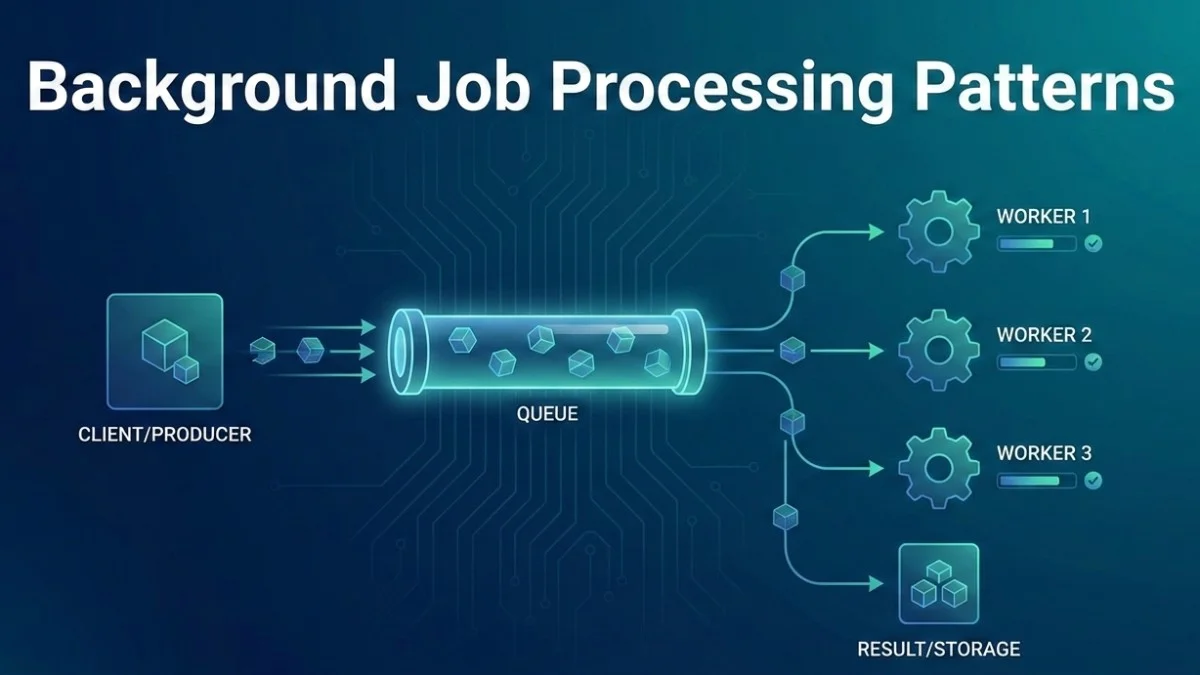
Background job processing moves time-consuming tasks out of the request cycle, improving user experience and application reliability. This guide covers patterns for implementing robust background processing in Laravel applications.
Why Background Jobs?
The Request Cycle Problem
When users wait for slow operations, frustration builds quickly. Moving work to the background keeps your application responsive.
User Request → Processing → Response
              (blocking)
              2-30 seconds

User: "Is this thing frozen?"
Moving work to background:
User Request → Queue Job → Response (immediate)
                    ↓
              Worker Process
              (async, no waiting)
This pattern transforms a frustrating wait into an instant confirmation, with the actual work happening behind the scenes.
What to Process in Background
- Email sending
- PDF generation
- Image processing
- API calls to external services
- Report generation
- Data imports/exports
- Notifications
- Search indexing
- Cleanup tasks
Laravel Queue Basics
Creating Jobs
Laravel's artisan command generates a job class with all the necessary boilerplate. Jobs implement the ShouldQueue interface to indicate they should be processed asynchronously.
php artisan make:job ProcessOrderPayment
The generated job class includes traits that handle serialization, queuing, and interaction with the queue system. Here's what a typical job looks like.
// app/Jobs/ProcessOrderPayment.php
namespace App\Jobs;

use App\Models\Order;
use Illuminate\Bus\Queueable;
use Illuminate\Contracts\Queue\ShouldQueue;
use Illuminate\Foundation\Bus\Dispatchable;
use Illuminate\Queue\InteractsWithQueue;
use Illuminate\Queue\SerializesModels;

class ProcessOrderPayment implements ShouldQueue
{
    use Dispatchable, InteractsWithQueue, Queueable, SerializesModels;

    public function __construct(
        public Order $order
    ) {}

    public function handle(PaymentGateway $gateway): void
    {
        $result = $gateway->charge(
            $this->order->customer,
            $this->order->total
        );

        $this->order->update([
            'payment_status' => $result->success ? 'paid' : 'failed',
            'transaction_id' => $result->transactionId,
        ]);
    }
}
Notice that the PaymentGateway is type-hinted in handle(), not the constructor. Laravel's container automatically injects dependencies when the job runs.
Dispatching Jobs
Laravel provides several ways to dispatch jobs, each suited to different scenarios. You can dispatch immediately, with a delay, or to specific queues.
// Dispatch immediately to queue
ProcessOrderPayment::dispatch($order);

// Dispatch with delay
ProcessOrderPayment::dispatch($order)
    ->delay(now()->addMinutes(5));

// Dispatch to specific queue
ProcessOrderPayment::dispatch($order)
    ->onQueue('payments');

// Dispatch to specific connection
ProcessOrderPayment::dispatch($order)
    ->onConnection('redis');

// Conditional dispatch
ProcessOrderPayment::dispatchIf($order->needsPayment(), $order);
ProcessOrderPayment::dispatchUnless($order->isPaid(), $order);
Using specific queues lets you prioritize different types of work. Critical payment jobs can run on a dedicated queue with more workers.
Job Configuration
Retries and Backoff
Configure retry behavior to handle transient failures gracefully. These properties control how Laravel handles job failures and retries.
class ProcessOrderPayment implements ShouldQueue
{
    public int $tries = 3;            // Maximum attempts
    public int $maxExceptions = 2;    // Max exceptions before failing
    public int $timeout = 60;         // Seconds before timeout

    // Exponential backoff between retries
    public function backoff(): array
    {
        return [10, 60, 300]; // 10s, 1m, 5m
    }

    // Or calculate dynamically
    public function backoff(): int
    {
        return $this->attempts() * 60;
    }
}
Exponential backoff prevents overwhelming a failing service. The first retry happens quickly, but subsequent retries wait progressively longer.
Unique Jobs
Prevent duplicate jobs:
When the same job might be dispatched multiple times (like from a webhook), unique jobs ensure only one instance runs. This prevents duplicate processing.
use Illuminate\Contracts\Queue\ShouldBeUnique;

class SendWelcomeEmail implements ShouldQueue, ShouldBeUnique
{
    public function __construct(
        public User $user
    ) {}

    // Unique based on user ID
    public function uniqueId(): string
    {
        return $this->user->id;
    }

    // Unique lock duration
    public int $uniqueFor = 3600; // 1 hour
}
The uniqueId method determines uniqueness. Here, only one welcome email job per user can exist in the queue at a time.
Rate Limiting
Control how frequently jobs can run to avoid overwhelming external services or your own infrastructure. Define rate limiters in your service provider.
use Illuminate\Queue\Middleware\RateLimited;

class SendNotification implements ShouldQueue
{
    public function middleware(): array
    {
        return [new RateLimited('notifications')];
    }
}

// In AppServiceProvider
RateLimiter::for('notifications', function ($job) {
    return Limit::perMinute(100);
});
Jobs that exceed the rate limit are released back to the queue with a delay, automatically spreading the load over time.
Error Handling
Failed Jobs
Robust error handling distinguishes production-ready jobs from prototypes. The failed method runs when a job permanently fails after exhausting retries.
class ProcessOrderPayment implements ShouldQueue
{
    public function handle(PaymentGateway $gateway): void
    {
        $result = $gateway->charge($this->order);

        if (!$result->success) {
            // Explicit failure - won't retry
            $this->fail(new PaymentFailedException($result->error));
        }
    }

    public function failed(?Throwable $exception): void
    {
        // Called when job fails permanently
        Log::error('Payment processing failed', [
            'order_id' => $this->order->id,
            'error' => $exception?->getMessage(),
        ]);

        // Notify admin
        AdminNotification::send(
            "Payment failed for order {$this->order->id}"
        );

        // Update order status
        $this->order->update(['status' => 'payment_failed']);
    }
}
Calling $this->fail() immediately marks the job as failed without retrying. This is useful when you know retrying won't help.
Retry Specific Exceptions
Not all exceptions deserve retries. Connection timeouts might resolve, but validation errors won't. Handle different exception types appropriately.
class CallExternalApi implements ShouldQueue
{
    // Only retry these exceptions
    public function retryUntil(): DateTime
    {
        return now()->addHours(1);
    }

    public function handle(): void
    {
        try {
            Http::timeout(30)->get('https://api.example.com');
        } catch (ConnectionException $e) {
            // Will retry
            throw $e;
        } catch (ClientException $e) {
            // 4xx errors - don't retry
            $this->fail($e);
        }
    }
}
The retryUntil method sets an absolute deadline. Jobs retry until they succeed or the deadline passes.
Job Chaining
Sequential Jobs
When jobs must run in order, chaining ensures each completes before the next begins. This is essential for workflows with dependencies between steps.
use Illuminate\Support\Facades\Bus;

// Jobs run in sequence
Bus::chain([
    new ProcessOrder($order),
    new ChargePayment($order),
    new SendConfirmation($order),
    new NotifyWarehouse($order),
])->dispatch();

// With error handling
Bus::chain([
    new ProcessOrder($order),
    new ChargePayment($order),
    new SendConfirmation($order),
])->catch(function (Throwable $e) use ($order) {
    Log::error('Order chain failed', ['order' => $order->id]);
    $order->update(['status' => 'failed']);
})->dispatch();
If any job in the chain fails, subsequent jobs don't run. The catch callback handles cleanup when chains fail.
Job Batches
Batches run jobs in parallel while tracking overall progress. They're perfect for processing large data sets where individual items are independent.
use Illuminate\Bus\Batch;
use Illuminate\Support\Facades\Bus;

$batch = Bus::batch([
    new ProcessImage($image1),
    new ProcessImage($image2),
    new ProcessImage($image3),
])
->then(function (Batch $batch) {
    // All jobs completed successfully
    Log::info('Batch completed', ['id' => $batch->id]);
})
->catch(function (Batch $batch, Throwable $e) {
    // First job failure
    Log::error('Batch failed', ['error' => $e->getMessage()]);
})
->finally(function (Batch $batch) {
    // Batch finished (success or failure)
    Notification::send('Batch processing complete');
})
->allowFailures()  // Continue even if some jobs fail
->dispatch();

// Check batch status
$batch = Bus::findBatch($batchId);
echo $batch->progress();      // 75
echo $batch->finished();      // false
echo $batch->failedJobs;      // 1
The allowFailures option is useful when partial success is acceptable. Without it, the first failure cancels remaining jobs.
Queue Workers
Running Workers
The queue worker command processes jobs from the queue. Different flags control worker behavior for various scenarios.
# Basic worker
php artisan queue:work

# Specific queue
php artisan queue:work --queue=high,default,low

# Memory limit
php artisan queue:work --memory=512

# Process single job
php artisan queue:work --once

# Timeout per job
php artisan queue:work --timeout=60

# Sleep when no jobs
php artisan queue:work --sleep=3

# Stop when queue is empty
php artisan queue:work --stop-when-empty
The queue order matters: high,default,low processes high-priority jobs first, only moving to lower queues when higher ones are empty.
Production Worker Management
In production, use a process manager like Supervisor to keep workers running reliably. Supervisor restarts workers if they crash and handles log rotation.
# /etc/supervisor/conf.d/laravel-worker.conf
[program:laravel-worker]
process_name=%(program_name)s_%(process_num)02d
command=php /var/www/html/artisan queue:work redis --sleep=3 --tries=3 --max-time=3600
autostart=true
autorestart=true
stopasgroup=true
killasgroup=true
user=www-data
numprocs=4
redirect_stderr=true
stdout_logfile=/var/www/html/storage/logs/worker.log
stopwaitsecs=3600
The numprocs=4 setting runs four worker processes. Adjust based on your server's CPU cores and job characteristics.
Laravel Horizon
Redis queue dashboard and worker manager:
Horizon provides a beautiful dashboard for monitoring queues and fine-grained control over worker scaling. It's the recommended solution for Redis-based queues.
// config/horizon.php
return [
    'environments' => [
        'production' => [
            'supervisor-1' => [
                'connection' => 'redis',
                'queue' => ['high', 'default', 'low'],
                'balance' => 'auto',
                'minProcesses' => 1,
                'maxProcesses' => 10,
                'balanceMaxShift' => 1,
                'balanceCooldown' => 3,
            ],
        ],
    ],
];
The balance: auto setting dynamically adjusts worker count based on queue load, scaling up during busy periods and down during quiet ones.
Queue Patterns
Priority Queues
Different job types deserve different priorities. Critical notifications shouldn't wait behind bulk report generation. Structure your queues accordingly.
// Define queue priorities
class SendNotification implements ShouldQueue
{
    public function __construct(
        public Notification $notification
    ) {}

    public function queue(): string
    {
        return match ($this->notification->priority) {
            'urgent' => 'high',
            'normal' => 'default',
            'low' => 'low',
        };
    }
}

// Worker processes high first
php artisan queue:work --queue=high,default,low
Job Middleware
Middleware intercepts jobs before they run, enabling cross-cutting concerns like preventing overlapping execution or skipping duplicates.
// Prevent overlapping jobs
use Illuminate\Queue\Middleware\WithoutOverlapping;

class SyncInventory implements ShouldQueue
{
    public function middleware(): array
    {
        return [
            new WithoutOverlapping($this->product->id)
                ->expireAfter(300)
                ->dontRelease(),
        ];
    }
}

// Skip if duplicate in progress
use Illuminate\Queue\Middleware\Skip;

class ProcessReport implements ShouldQueue
{
    public function middleware(): array
    {
        return [
            Skip::when($this->reportAlreadyProcessing()),
        ];
    }
}
WithoutOverlapping acquires a lock before running. If another instance has the lock, the job either waits or is discarded based on configuration.
Throttling External APIs
When calling rate-limited external APIs, throttle your jobs to stay within limits. This middleware automatically backs off when exceptions occur frequently.
use Illuminate\Queue\Middleware\ThrottlesExceptions;

class CallExternalApi implements ShouldQueue
{
    public function middleware(): array
    {
        return [
            (new ThrottlesExceptions(10, 5))  // 10 exceptions per 5 minutes
                ->backoff(5),                  // Wait 5 minutes after throttle
        ];
    }
}
This middleware tracks exceptions. After 10 failures in 5 minutes, it pauses all matching jobs for the backoff period.
Testing Jobs
Faking Queues
In tests, you often want to verify jobs are dispatched without actually running them. Queue faking intercepts dispatches and records them for assertions.
use Illuminate\Support\Facades\Queue;

public function test_order_dispatches_payment_job(): void
{
    Queue::fake();

    $order = Order::factory()->create();
    $order->process();

    Queue::assertPushed(ProcessOrderPayment::class, function ($job) use ($order) {
        return $job->order->id === $order->id;
    });
}

public function test_batch_jobs_dispatched(): void
{
    Queue::fake();

    $this->service->processImages($images);

    Queue::assertBatched(function ($batch) use ($images) {
        return $batch->jobs->count() === count($images);
    });
}
The callback in assertPushed lets you verify the job was created with the correct data.
Testing Job Logic
To test what a job actually does, instantiate it directly and call handle() with mocked dependencies. This tests the job's behavior in isolation.
public function test_payment_job_charges_customer(): void
{
    $gateway = $this->mock(PaymentGateway::class);
    $gateway->expects('charge')
        ->once()
        ->andReturn(new PaymentResult(success: true));

    $order = Order::factory()->create();
    $job = new ProcessOrderPayment($order);

    $job->handle($gateway);

    $this->assertEquals('paid', $order->fresh()->payment_status);
}

public function test_failed_payment_notifies_admin(): void
{
    Notification::fake();

    $order = Order::factory()->create();
    $job = new ProcessOrderPayment($order);

    $job->failed(new PaymentFailedException('Card declined'));

    Notification::assertSentTo(
        Admin::first(),
        PaymentFailedNotification::class
    );
}
Testing the failed method directly ensures your error handling works without waiting for actual failures.
Monitoring
Queue Metrics
Track job performance to identify bottlenecks and failures before they impact users. Log duration and key metrics for analysis.
// Track job duration
class ProcessOrder implements ShouldQueue
{
    public function handle(): void
    {
        $start = microtime(true);

        // Process...

        $duration = microtime(true) - $start;
        Log::info('Job completed', [
            'job' => class_basename($this),
            'duration_ms' => round($duration * 1000),
        ]);
    }
}

// Dashboard metrics
$metrics = [
    'pending' => Queue::size('default'),
    'failed' => DB::table('failed_jobs')->count(),
    'processed_today' => Cache::get('jobs_processed_today', 0),
];
Consider sending metrics to a monitoring service like Datadog or New Relic for visualization and alerting.
Alerting
Proactive alerts catch queue problems before users notice. Set thresholds based on normal operation patterns and escalate appropriately.
// Alert on queue backup
if (Queue::size('default') > 1000) {
    Alert::send('Queue backup detected');
}

// Alert on failed jobs
Event::listen(JobFailed::class, function ($event) {
    if ($this->isHighPriorityJob($event->job)) {
        Alert::send("Critical job failed: {$event->job->displayName()}");
    }
});
Alert fatigue is real. Start with high thresholds and tighten them as you understand normal patterns.
Best Practices
- Keep jobs small - Single responsibility, one task per job
- Make jobs idempotent - Safe to run multiple times
- Serialize minimally - Pass IDs, not full models when possible
- Handle failures gracefully - Always implement
failed()method - Set appropriate timeouts - Match expected job duration
- Use queue priorities - Separate urgent from batch work
- Monitor queue health - Track size, failures, processing time
- Test job logic - Unit test the
handle()method
Conclusion
Background job processing is essential for responsive applications. Laravel's queue system provides everything needed: job creation, retry logic, batching, and monitoring. Start with simple jobs, add proper error handling, implement monitoring, and scale workers as needed. The key is moving any work that doesn't need to complete during the request cycle into the background.